
Introduction
If you hold meaningful amounts of crypto, cold storage is not optional — it is the baseline requirement for security. Ledger is the market-leading hardware wallet manufacturer, with over six million devices sold and support for more than 5,500 assets. It is the solution most institutional-adjacent crypto holders reach for when they move beyond exchange custody.
This review covers what Ledger does, how it works, which device is right for which use case, and the limitations you should be aware of before buying. We use Ledger ourselves and recommend it — but with clear context on when it is and is not the right solution.
Affiliate disclosure: links to Ledger on this page are affiliate links. We receive a commission if you purchase through them, at no cost to you. Our assessment is independent — see our affiliate policy.
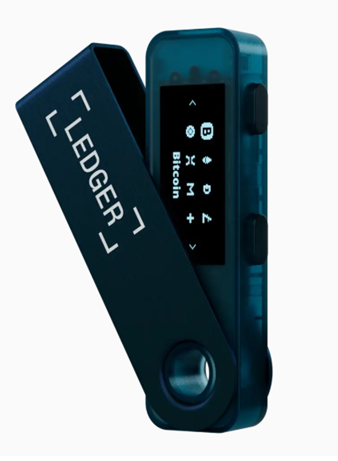
What a Hardware Wallet Actually Does
Before covering the devices themselves, it helps to be precise about what a hardware wallet does — and what it does not do.
A hardware wallet does not store your crypto. Your assets exist on the blockchain. What the wallet stores is your private key — the cryptographic proof of ownership that authorises transactions. The security model of a hardware wallet is built around one principle: the private key never leaves the device, and never touches an internet-connected computer.
When you sign a transaction with a Ledger device:
- The transaction is constructed on your computer or phone
- It is sent to the Ledger device for signing
- The device signs it internally using the private key — which stays on the chip
- The signed transaction is returned to your computer and broadcast to the network
An attacker who controls your computer can see what transaction you are signing, but cannot access the private key and cannot forge a different signature. The device is the final gate.
This is fundamentally different from a software wallet (MetaMask, Phantom, etc.), where the private key exists in your browser or phone memory and is theoretically accessible to malware.
The Secure Element — Why It Matters
Ledger devices use a Secure Element (SE) chip — the same category of chip used in credit cards, SIM cards, and passports. This is the core security advantage of Ledger over some competitors.
| Feature | Secure Element (Ledger) | Standard Microcontroller |
|---|---|---|
| Physical attack resistance | High — designed to resist fault injection and side-channel attacks | Lower — more vulnerable to physical extraction |
| Tamper detection | Yes — chip self-destructs on physical tampering attempts | Varies |
| Certified security standard | CC EAL5+ / EAL6+ | Typically none |
| Key extraction risk | Very low | Higher with physical access |
The tradeoff: Secure Element chips have proprietary firmware, which means Ledger’s OS (BOLOS) is not fully open-source. This has been a point of debate in the crypto security community. Trezor, by contrast, uses an open-source approach on standard microcontrollers. Both models have strong security records — the choice between them is partly philosophical.
The Device Lineup
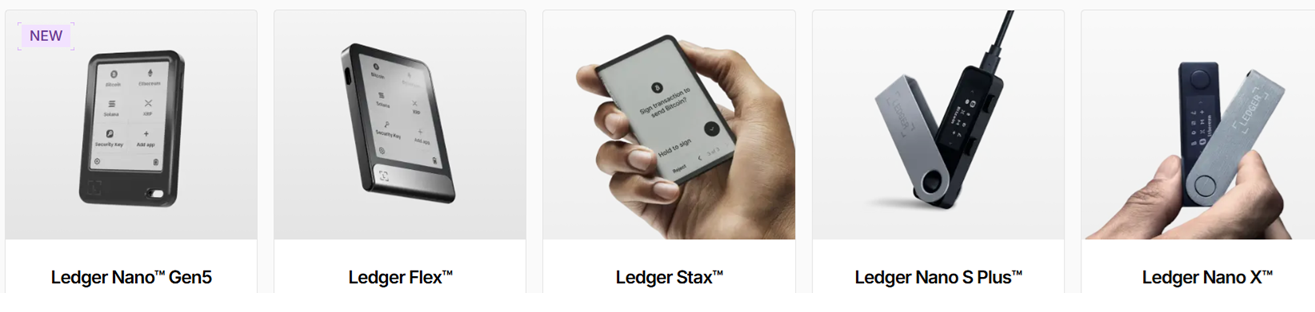
Ledger now offers five devices across two form factor families: the classic dongle-style Nano range, and the newer touchscreen range. The right choice depends on how often you access your wallet and whether mobile use matters to you.
| Device | Connection | Screen | Battery | Best for |
|---|---|---|---|---|
| Nano Gen5 | USB-C + Bluetooth | Touchscreen (E Ink) | Yes | Entry-level touchscreen, everyday use |
| Flex | USB-C + Bluetooth + NFC | 2.8″ touchscreen (E Ink) | Yes | Mid-range, strong UX balance |
| Stax | USB-C + Bluetooth + NFC | 3.7″ curved touchscreen (E Ink) | Yes | Premium, best screen, most readable |
| Nano S Plus | USB-C only | Small display, 2 buttons | No (bus-powered) | Pure cold storage, rarely moved |
| Nano X | USB-C + Bluetooth | Small display, 2 buttons | Yes | Mobile use with classic form factor |
For most people coming from a TradFi background: the Flex is the pragmatic mid-range choice — the touchscreen makes transaction verification substantially clearer than the two-button interface, and the price sits between the entry-level Nano Gen5 and the premium Stax. If you want the best experience and screen real estate, the Stax is worth the premium. If you primarily manage holdings from a desktop and rarely move the device, the Nano S Plus covers all the essentials at the lowest cost.
Ledger Live — The Software Layer
The hardware device is one half of the solution. Ledger Live is the companion application (desktop and mobile) that handles asset management, transaction construction and app installation.
What Ledger Live does well: – Clean portfolio view across all connected accounts – Direct integration with DeFi protocols, staking, and DEXes via the integrated app browser – Buy/sell crypto via integrated partners (higher fees than exchanges but convenient) – Firmware and app updates managed within the application
What it does not do: – Replace a full-featured exchange for active trading — it is a custody tool, not a trading interface – Support every asset natively — some tokens require connecting to MetaMask or another wallet via WalletConnect
Asset Support
Ledger supports over 5,500 assets across more than 50 blockchains. The practically relevant coverage for most users:
| Category | Coverage |
|---|---|
| Bitcoin (BTC) | Full native support including Taproot addresses |
| Ethereum and EVM chains | Full — ETH, Arbitrum, Optimism, Base, Polygon, Avalanche, BSC |
| Solana | Full native support |
| ERC-20 tokens | All — managed via the Ethereum app |
| Cosmos ecosystem | Full — ATOM, OSMO and IBC chains |
| NFTs | Supported via Ledger Live and connected wallets |
Limitations and Known Issues
The 2023 Recover controversy: Ledger introduced an optional subscription service (Ledger Recover) that allows users to back up their seed phrase via encrypted shards sent to third parties. The crypto community reacted strongly — the concern was that this demonstrated the firmware could, in principle, extract and transmit the seed phrase. Ledger clarified that Recover is opt-in and requires physical device confirmation, but the episode damaged trust for some users. If this concerns you, opt out of Recover and do not enable it.
Ledger Live is not open-source: the device firmware and Ledger Live application are proprietary. Users who require fully auditable software should evaluate Trezor as an alternative.
Physical security is your responsibility: a hardware wallet protects your key from remote attackers. It does not protect against physical theft of the device combined with knowledge of your PIN — or against someone obtaining your seed phrase directly. Store your 24-word seed phrase offline, separately from the device, ideally in a fireproof location.
Who Should Use Ledger
| Use Case | Recommendation |
|---|---|
| Long-term Bitcoin or ETH holder (6+ months) | Strong recommendation — exchange custody risk is not worth it at meaningful amounts |
| Active DeFi user | Recommended — use Ledger connected to MetaMask for on-chain transactions |
| Active derivatives trader on CEX | Partial — keep only trading capital on exchange; store reserves in cold storage |
| Small amounts, learning crypto | Optional — software wallet is acceptable below a threshold you are comfortable losing |
| Institutional / fund custody | Ledger Enterprise exists but dedicated institutional custody solutions (Fireblocks, Copper) are purpose-built for this |
Key Takeaways
- A hardware wallet stores your private key offline — it is the fundamental security upgrade from exchange custody or software wallets for any meaningful holding
- Ledger’s Secure Element chip provides certified physical tamper resistance that is not available on standard microcontroller-based wallets
- Five devices to choose from: Nano Gen5 and Flex for everyday use, Stax for the premium experience, Nano S Plus for pure cold storage, Nano X for mobile flexibility with a classic form factor
- Ledger Live covers the practical needs of most holders — for DeFi interaction, connect via MetaMask using WalletConnect
- The 2023 Recover controversy is worth understanding — opt out if you prefer a traditional self-custody model
- A hardware wallet does not replace operational security — your 24-word seed phrase, stored offline and separately from the device, is the ultimate backup