Introduction
Trezor invented the hardware wallet. When SatoshiLabs launched the original Trezor in 2014, it established the design paradigm that the entire industry has followed since: a dedicated offline device that signs transactions without exposing the private key to an internet-connected computer. A decade later, Trezor remains one of the two dominant names in self-custody — and for users who prioritise open-source transparency above all else, it remains the benchmark.
This review covers Trezor’s current three-device lineup, its security model, how it compares with Ledger and Tangem, and the specific scenarios where Trezor’s open-source approach is a meaningful advantage rather than a technical detail.
Affiliate disclosure: links to Trezor on this page are affiliate links. We receive a commission if you purchase through them, at no cost to you. Our assessment is independent — see our affiliate policy.
The Open-Source Differentiator
Trezor’s most significant differentiator is not a hardware feature — it is a philosophy. Both the device firmware and the hardware schematics are fully open-source and publicly available on GitHub. Anyone can audit the code, identify vulnerabilities, and verify that the device behaves as described.
This matters for one fundamental reason: in security, trust should be verifiable, not assumed. Ledger’s firmware is proprietary — you trust that it behaves correctly. With Trezor, the global security research community can verify it. Over the years, researchers have identified and reported vulnerabilities through this process, and Trezor has patched them. The open model has made the device more secure over time, not less.
The tradeoff: open-source firmware means that attack vectors are also publicly visible. Trezor’s security model compensates for this through the Secure Element chip (in all current models) and through the assumption that physical access to the device is required to exploit any known vulnerability.
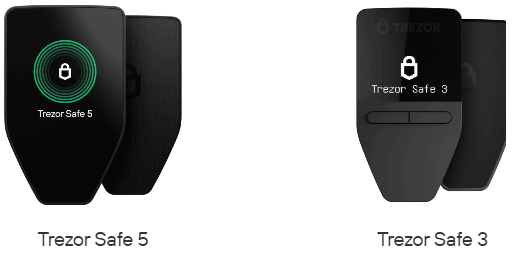
The Device Lineup
| Device | Connection | Screen | Secure Element | Best for |
|---|---|---|---|---|
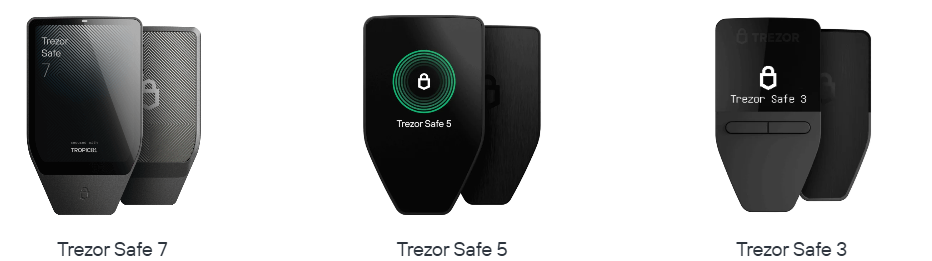
| Trezor Safe 3 | USB-C only | Small OLED, 2 buttons | Yes — EAL6+ | Straightforward cold storage, lowest cost |
| Trezor Safe 5 | USB-C only | 1.54″ colour touchscreen | Yes — EAL6+ | Frequent use, readable transaction verification |
| Trezor Safe 7 | USB-C only | Large colour touchscreen | Yes — EAL6+ | Premium experience, best screen, power users |
No Trezor model has Bluetooth. This is deliberate — SatoshiLabs considers the removal of wireless communication a security feature, eliminating an entire category of radio-based attack vectors. For users who want to manage holdings from a phone without a cable, this is a real constraint. For users who prioritise a fully air-gapped signing experience, it is a feature.
For most users: the Safe 3 is the practical entry point — capable, affordable, and sufficient for the vast majority of cold storage needs. The Safe 5’s touchscreen makes transaction verification significantly more readable, which matters if you regularly interact with DeFi protocols where transaction details are complex. The Safe 7 is the flagship for those who want the best screen and user experience Trezor offers.
Security Architecture
Trezor’s security model across all three current devices combines two chips:
1. The main microcontroller (STM32): handles transaction signing and general operations. The firmware running on this chip is fully open-source.
2. The Secure Element (Infineon SLE97): stores the PIN and handles key derivation. Certified to CC EAL6+. Used specifically to protect against physical extraction attacks on the PIN — it does not store the private key directly.
This dual-chip architecture is a deliberate design choice: keep the security-critical but auditable operations on the open-source MCU, and use the Secure Element specifically for the PIN protection layer that benefits most from tamper-resistant hardware.
| Attack Vector | Trezor’s Protection |
|---|---|
| Remote malware on connected computer | Key never leaves the device — transaction verified on screen before signing |
| Physical PIN brute-force | Secure Element locks after failed attempts; exponential delay between attempts |
| Physical chip extraction | Secure Element tamper resistance; passphrase adds a layer not stored on device |
| Supply chain tampering | Firmware verification on first boot; bootloader checks signatures |
| Firmware backdoor | Open-source — community-auditable; reproducible builds available |
Shamir Backup — An Alternative to a Single Seed Phrase
Trezor supports Shamir Backup (SLIP39) — an advanced alternative to the standard 24-word seed phrase that is unique to Trezor among major hardware wallets.
Standard backup: one seed phrase. If found, funds are gone. If lost, funds are gone.
Shamir Backup splits your seed into multiple shares — you define both the total number of shares and the minimum number required to reconstruct the key. For example, a 3-of-5 scheme generates 5 shares and requires any 3 to recover:
- Store one share at home
- Store one share at your lawyer or accountant
- Store one share in a bank safe deposit box
- The remaining two provide redundancy
An attacker who finds one or two shares cannot reconstruct the key. If you lose one or two shares, you can still recover with the remaining three. This is meaningfully more robust than a single seed phrase for users with significant holdings.
Shamir Backup is optional — standard BIP39 seed phrases are also supported for compatibility with other wallets.
Trezor Suite — The Companion Software
Trezor Suite is available as a desktop application (Windows, macOS, Linux) and as a browser-based web app at suite.trezor.io. It is notably more feature-rich than Ledger Live for users who want granular control:
Coin control: select specific UTXOs for Bitcoin transactions — important for privacy-conscious users who want to avoid linking wallet addresses.
Tor integration: route Trezor Suite traffic through Tor directly from the application — a meaningful privacy feature not available natively in Ledger Live.
Multiple accounts per coin: useful for separating holdings by purpose — trading reserve, long-term storage, operational wallet.
No built-in exchange: unlike Ledger Live, Trezor Suite does not offer integrated buy/sell services. This keeps the application focused on custody rather than revenue generation.
For DeFi interaction, connect Trezor to MetaMask via the Trezor browser extension — the workflow is well-established and supported across all major EVM-compatible protocols.
Asset Support
| Category | Coverage |
|---|---|
| Bitcoin (BTC) | Full — Legacy, SegWit, Native SegWit, Taproot, coin control |
| Ethereum and EVM chains | Full — ETH plus all major L2s via MetaMask connection |
| ERC-20 tokens | All — managed via Ethereum app or MetaMask |
| Solana | Supported on all current models |
| Cardano, XRP, Stellar | Supported |
| Monero (XMR) | Supported — one of few hardware wallets with native Monero support |
Trezor’s Monero support deserves a mention — it is one of the few hardware wallets that supports XMR natively, which matters for privacy-focused users.
Pricing
| Device | Price (approx.) |
|---|---|
| Trezor Safe 3 | ~$79 |
| Trezor Safe 5 | ~$169 |
| Trezor Safe 7 | ~$219 |
The Safe 3 is the most affordable entry point into open-source hardware security. The Safe 5 sits at a similar price to the Ledger Flex. The Safe 7 is the flagship and competes with the Ledger Stax at the premium end of the market.
Who Should Use Trezor
| Use Case | Recommendation |
|---|---|
| Open-source purists who want fully auditable firmware | Strong recommendation — Trezor is the benchmark here |
| Users wanting Shamir Backup for institutional-grade seed management | Strong recommendation — unique to Trezor among consumer devices |
| Bitcoin-focused users wanting coin control and Tor | Strong recommendation — Trezor Suite’s Bitcoin tools are best in class |
| Active DeFi users on EVM chains | Suitable — MetaMask integration is solid and well-supported |
| Mobile-first users wanting Bluetooth | Not suitable — USB-only on all current models |
| Users wanting integrated buy/sell in the app | Not suitable — Trezor Suite focuses purely on custody |
Trezor vs Ledger vs Tangem — How to Choose
| Trezor Safe 5 | Ledger Flex | Tangem (3-card) | |
|---|---|---|---|
| Open-source firmware | Yes — fully | No — proprietary | Yes — audited |
| Secure Element | Yes — EAL6+ | Yes — EAL5+/6+ | Yes — EAL6+ |
| Bluetooth / wireless | No | Yes (Bluetooth + NFC) | Yes (NFC) |
| Mobile app | No | Yes | Yes (primary interface) |
| Seed phrase backup | Yes + Shamir option | Yes | No (cards as backup) |
| Price | ~$169 | ~$149 | ~$69 |
| Best for | Open-source, Bitcoin power users | Mobile flexibility, widest ecosystem | Simplicity, non-technical users |
Key Takeaways
- Trezor invented the hardware wallet in 2014 and remains the gold standard for open-source cold storage — every line of firmware is publicly auditable
- All three current models — Safe 3, Safe 5 and Safe 7 — include a Secure Element chip (CC EAL6+) combined with an open-source main microcontroller
- Shamir Backup (SLIP39) is a unique and meaningful feature for users who want institutional-grade seed management without a single point of failure
- Trezor Suite’s Bitcoin tools — coin control, Tor integration, multiple accounts — are the most comprehensive of any hardware wallet companion software
- No Bluetooth on any current model — a deliberate security choice that makes Trezor a desktop-first device
- For open-source advocates, Bitcoin power users, and Shamir Backup: Trezor is the right choice. For mobile flexibility: Ledger. For maximum simplicity: Tangem.