Introduction
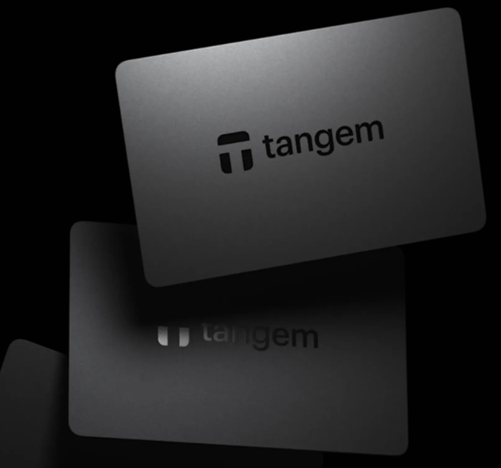
Most hardware wallets look like USB drives. Tangem looks like a credit card. It is a fundamentally different approach to cold storage — no screen, no cables, no seed phrase by default, and a price point well below the established alternatives. For a segment of users, this combination makes Tangem the most practical cold storage solution available. For others, the same design choices are dealbreakers.
This review covers what Tangem actually is, how its security model differs from traditional hardware wallets, which use cases it fits well and which it does not, and the specific tradeoffs you need to understand before committing to it as your custody solution.
Affiliate disclosure: links to Tangem on this page are affiliate links. We receive a commission if you purchase through them, at no cost to you. Our assessment is independent — see our affiliate policy.
How Tangem Works
Tangem is an NFC-enabled smart card. There is no battery, no screen, and no USB port. The card communicates with your smartphone via a tap — the same technology used by contactless payment cards.
The security model diverges from traditional hardware wallets in one significant way: Tangem generates and stores your private key on the card itself, and the key never leaves the chip — not even during setup. There is no seed phrase displayed during onboarding, because the key is generated on-device and stays there.
The transaction flow:
- Open the Tangem app on your phone
- Construct a transaction — send, receive, interact with a DeFi protocol
- Tap your Tangem card to your phone to sign
- The card signs the transaction internally and returns the signed output
- The app broadcasts the transaction to the network
No cables. No computer required. The entire workflow runs from a smartphone.
The No-Seed-Phrase Model — Feature or Risk?
This is the most debated aspect of Tangem and the most important thing to understand before buying.
Traditional hardware wallets give you a 24-word seed phrase during setup. This phrase is a backup — if you lose the device, you recover your funds with the words. The words are also the risk — anyone who finds your seed phrase has your funds.
Tangem’s default model eliminates the seed phrase entirely. Your backup is not words — it is additional cards. You buy a 2-card or 3-card set, and each card stores the same key. If you lose one card, you use another. If you lose all cards, your funds are gone — there is no recovery mechanism.
| Traditional Hardware Wallet | Tangem (default) | |
|---|---|---|
| Backup mechanism | 24-word seed phrase | Additional cards (2 or 3) |
| Risk if backup lost | Funds permanently inaccessible | Funds permanently inaccessible |
| Risk if backup found by attacker | Funds compromised (seed phrase gives full access) | Low — attacker also needs card PIN |
| Recovery without backup | Impossible | Impossible |
| Compatibility with other wallets | High — seed phrase works across all BIP39-compatible wallets | None — key is card-specific |
Tangem’s argument: most crypto losses come not from exchange hacks but from seed phrase mismanagement — lost paper, house fires, family members who cannot find or understand a 24-word backup. Removing the seed phrase removes that attack surface.
The counterargument: the seed phrase model allows you to recover funds on any compatible wallet if Tangem as a company ceases to exist or stops supporting your device. With Tangem’s default model, your backup path runs entirely through Tangem’s card ecosystem.
Note: Tangem does offer an optional seed phrase backup mode for users who want cross-wallet compatibility. This is off by default and must be explicitly enabled during setup.
Security Architecture
Tangem uses the Samsung S3D350A Secure Element, certified to CC EAL6+ — a higher certification level than many competing devices. The key is generated on the chip during first use and is physically impossible to extract — Tangem themselves cannot retrieve it.
Firmware: Tangem’s card firmware is open-source and audited by Kudelski Security. The companion app is also open-source. This is a meaningful advantage over Ledger, which has proprietary firmware.
PIN protection: each card requires a PIN of 1–8 digits. After a defined number of incorrect PIN attempts, the card permanently locks itself — preventing brute-force attacks if a card is stolen.
Physical durability: rated IP68 (waterproof to 1.5m), operating temperature −25°C to 50°C. The card has no moving parts and no battery to degrade. Tangem claims a 25-year lifespan for the chip.
Asset Support
| Category | Coverage |
|---|---|
| Bitcoin (BTC) | Full native support including SegWit and Taproot |
| Ethereum and EVM chains | Full — ETH, Arbitrum, Optimism, Base, Polygon, Avalanche, BSC |
| Solana | Full native support |
| ERC-20 tokens | All — managed via the Ethereum network |
| TON, XRP, Stellar, Tron | Supported |
| Cosmos ecosystem | Partial — check Tangem’s current compatibility list |
Tangem’s asset support is broad and growing. The Tangem app handles all supported chains — there are no separate apps to install per asset, unlike Ledger’s model where each blockchain requires a dedicated application on the device.
The Tangem App
The Tangem app is notably cleaner and more modern than Ledger Live. Asset management, staking, and DeFi interaction are handled within the app — WalletConnect integration allows connection to external dApps that are not natively supported.
Limitation: the app is mobile-only. There is no desktop application. If your workflow requires managing holdings from a computer, Tangem is not compatible without using a third-party wallet connected via WalletConnect (which reduces some of the simplicity advantage).
Pricing
Tangem’s pricing is a significant differentiator:
| Package | Price (approx.) | Best for |
|---|---|---|
| 2-card set | ~$55 | Minimum viable cold storage — one card to use, one backup |
| 3-card set | ~$69 | Recommended — use one, store two backups separately |
Compared with a Ledger Nano X (~$149) or Ledger Flex (~$249), the Tangem 3-card set offers cold storage at roughly half the entry price. For users who want simple cold storage without the complexity of a screen-based device, this is a compelling proposition.
Who Should Use Tangem
| Use Case | Recommendation |
|---|---|
| Long-term BTC/ETH holder, mobile-first | Strong recommendation — simple, durable, affordable |
| Non-technical user new to self-custody | Strong recommendation — no seed phrase to manage incorrectly |
| Active DeFi user on multiple chains | Suitable — WalletConnect covers most protocols |
| User requiring desktop workflow | Not ideal — mobile-only app is a constraint |
| User wanting cross-wallet seed portability | Enable seed phrase mode during setup, or consider Ledger/Trezor |
| Gifting cold storage to a family member | Excellent choice — lowest friction onboarding available |
Tangem vs Ledger — How to Choose
Both are solid cold storage solutions with Secure Element chips and strong security records. The choice comes down to workflow and philosophy:
Choose Tangem if: you want maximum simplicity, a mobile-first workflow, no seed phrase to manage, and a lower price point. Particularly strong for buy-and-hold positions you access infrequently.
Choose Ledger if: you need desktop software, want a screen for independent transaction verification, require the widest possible asset support, or prefer the established seed phrase recovery model for cross-wallet portability.
There is no wrong answer between the two — the best hardware wallet is the one you will actually use consistently.
Key Takeaways
- Tangem is a card-based NFC hardware wallet — no screen, no cables, no computer required, managed entirely from a smartphone app
- The no-seed-phrase default model eliminates the most common cause of crypto loss (seed phrase mismanagement) but ties recovery entirely to your backup cards — store them separately
- Secure Element chip (CC EAL6+), open-source firmware audited by Kudelski Security — strong security credentials
- Asset support is broad and growing; the app is cleaner and simpler than Ledger Live
- At ~$69 for a 3-card set, Tangem is the most affordable credible cold storage solution on the market
- Not suitable for desktop-centric workflows or users who need independent screen verification of transactions